
Skip to navigation

Using the Pinch-Off Models

Installation

We recommend using pip, poetry, or uv to install the package.

pip install conductorquantum

Authentication

The SDK requires an API key for authentication. Sign in and create a new API key. Remember, your API key is your access secret - keep it safe with environment variables.

Using environment variables:

Python
from dotenv import load_dotenv
import os
from conductorquantum import ConductorQuantum
# Load API key from .env file
load_dotenv()
TOKEN = os.getenv("CONDUCTOR_API_KEY")
# Initialize client
client = ConductorQuantum(token=TOKEN)

Or provide the API key directly:

Python
from conductorquantum import ConductorQuantum
# Initialize client with API key
client = ConductorQuantum(token="YOUR_API_KEY")

Usage Examples

Using the Pinch-Off Classifier

The Pinch-Off Classifier is a model that can classify a given current measurement as either exhibiting Pinch-Off or not.

You can download an example file to follow along with the example:

Python
from dotenv import load_dotenv
import os
import numpy as np
from conductorquantum import ConductorQuantum
# Load API key from .env file
load_dotenv()
TOKEN = os.getenv("CONDUCTOR_API_KEY")
# Initialize client
client = ConductorQuantum(token=TOKEN)
# Load Pinch-off data (current measurement)
data = np.load("pinch-off-classifier-v0.npy") # shape (n, )
# Detect Pinch-off
result = client.control.models.run(
model="pinch-off-classifier-v0",
data=data
)
# Access the classification result
is_pinch_off = result.output["classification"]
print(f"Is pinch-off: {is_pinch_off}")
Output
Is pinch-off: True

Using the Pinch-Off Parameter Extractor

The Pinch-Off Parameter Extractor is a model that can extract the parameters of a given current measurement.

You can download an example file to follow along with the example:

Python
from dotenv import load_dotenv
import os
import numpy as np
from conductorquantum import ConductorQuantum
# Load API key from .env file
load_dotenv()
TOKEN = os.getenv("CONDUCTOR_API_KEY")
# Initialize client
client = ConductorQuantum(token=TOKEN)
# Load Pinch-off data (current measurement)
data = np.load("pinch-off-parameter-extractor-v0.npy") # shape (n, )
# Detect Pinch-off
result = client.control.models.run(
model="pinch-off-parameter-extractor-v0",
data=data
)
# Access the peak locations (indices)
pinch_off_parameters = result.output
print(f"Pinch-off parameters: {pinch_off_parameters}")
Output
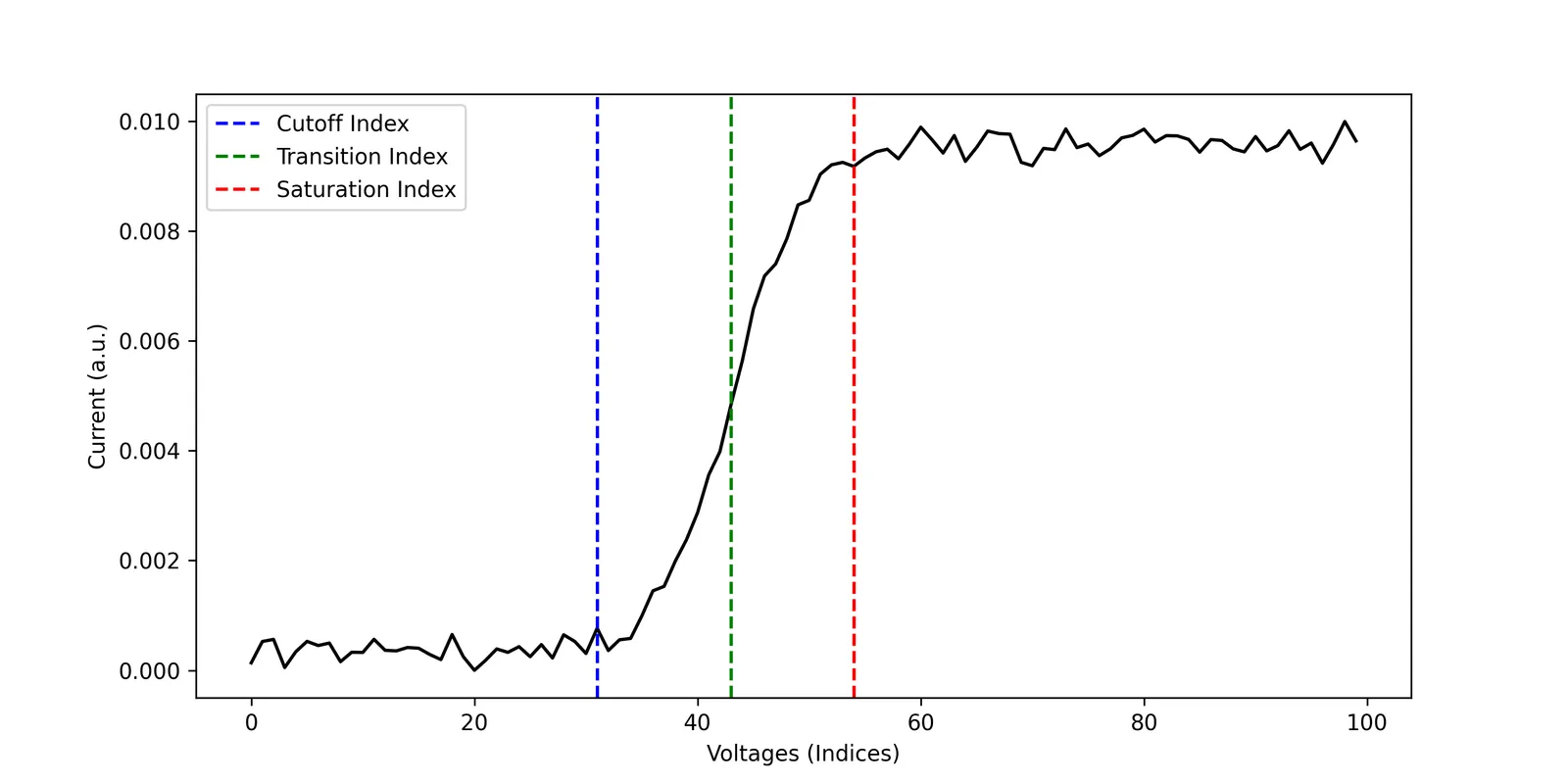
Pinch-off parameters: {'cut_off_index': 31, 'transition_index': 43, 'saturation_index': 54}

Plotting the Output

Python
import matplotlib.pyplot as plt
plt.figure(figsize=(10, 5), dpi=300)
plt.plot(data, 'k-')
plt.axvline(x=result.output["cut_off_index"], color='b', linestyle='--', label='Cutoff Index')
plt.axvline(x=result.output["transition_index"], color='g', linestyle='--', label='Transition Index')
plt.axvline(x=result.output["saturation_index"], color='r', linestyle='--', label='Saturation Index')
plt.xlabel('Voltages (Indices)')
plt.ylabel('Current (a.u.)')
plt.legend()
plt.show()
Pinch-off Parameter Extractor
Pinch-off Parameter Extractor v0 Output

Important Notes for Pinch-Off Models

  • Input dimensions: Input dimensions should ideally match the specified resolution of the model for the best results. You may need to interpolate or downsample your data to match the required shape. You can find the required input shapes for each model on the models overview page.
  • Data format: Input data should be a 1D numpy array representing current measurements as a function of gate voltage.
  • Output format:
    • The classifier outputs a boolean value (True or False) indicating whether the measurement exhibits pinch-off behavior.
    • The parameter extractor outputs a dictionary with three indices: cut_off_index, transition_index, and saturation_index, which correspond to key points in the pinch-off curve.
  • Model versions: Higher version numbers typically indicate improved accuracy and performance. Check the models overview for the latest available versions.